LLM Data Loss Prevention Tool Evaluation
Most sensitive data now enters AI tools, and legacy security tools can't detect it.

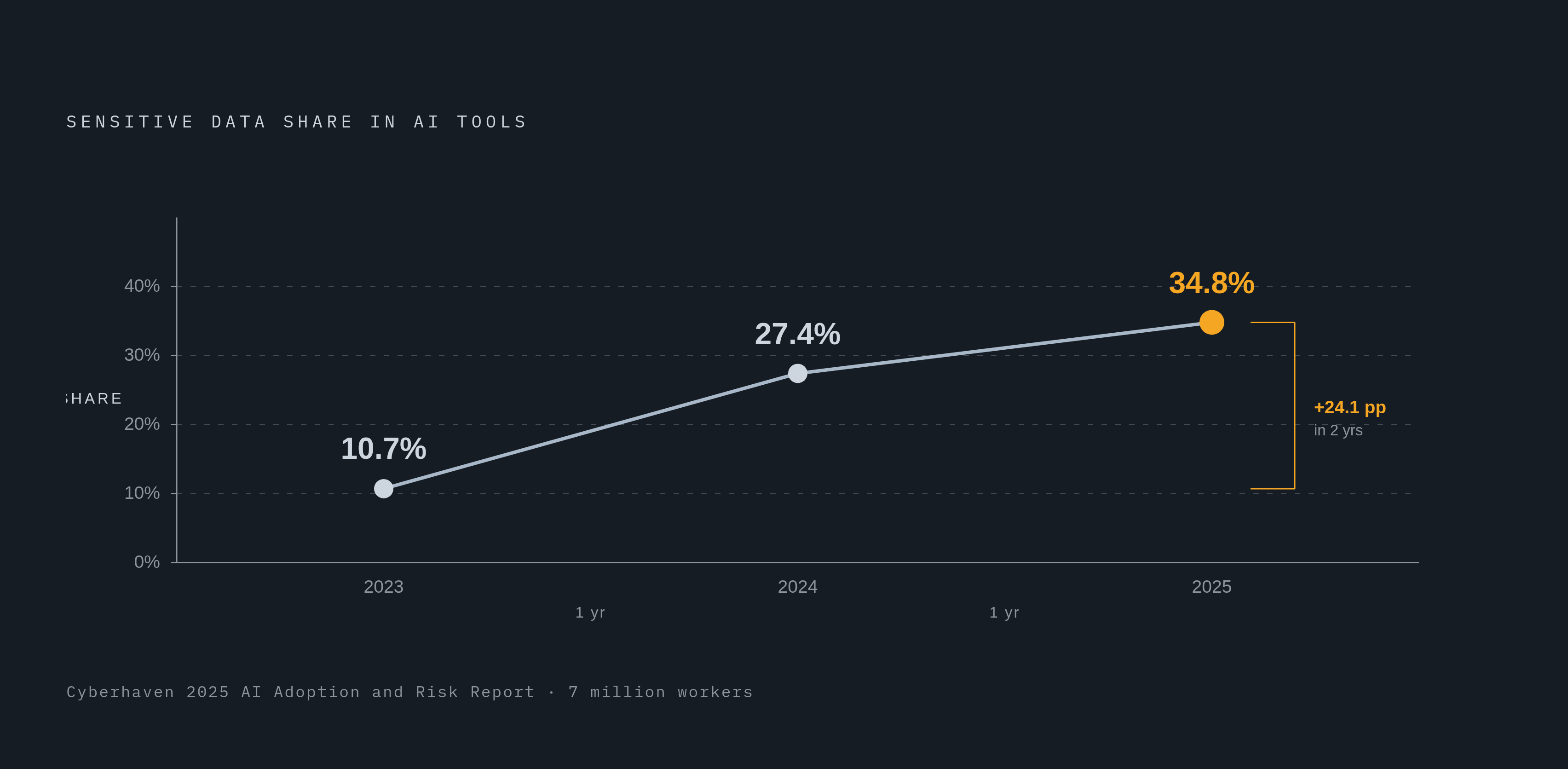
Employees pasting sensitive company data into ChatGPT isn't an edge case anymore. It's the default, and according to Cyberhaven's 2025 AI Adoption and Risk Report, which pulled data from 7 million workers, 34.8% of corporate data entered into AI tools now qualifies as sensitive, up from 27.4% a year before and just 10.7% two years before that. This piece walks through how to actually evaluate LLM data loss prevention tools against that reality, because the risk surface has changed faster than most security teams have caught up to.
Here's the thing that gets missed in most vendor pitches: employees are using these tools exactly as designed. On average, workers now put sensitive data into AI tools once every three days, per that same Cyberhaven report. That's a habit, baked into how work gets done now, not a rogue user occasionally ignoring policy.
Look at coding assistants. Cyberhaven found that 49.5% of developers use them regularly in 2025, up from roughly 20% at the start of that same year, a workflow shift happening in real time, across an entire profession, in under twelve months.
So what's actually going into these tools? Source code makes up 18.7% of sensitive data entering AI platforms, per Cyberhaven's numbers. R&D materials account for 17.1%, and sales and marketing data comes in at 10.7%. Notice what these have in common: none of it is a neat, structured database record. It's meeting notes, half-finished drafts, code snippets, financial models scribbled into a prompt because someone wanted a faster summary. Legacy classification systems were built to catch structured data leaving through known channels. They were never built to catch a paraphrased chunk of a product roadmap typed into a browser tab.
And the governance hasn't kept pace. McKinsey's 2026 AI Trust Maturity Survey found that 71% of organizations use generative AI regularly in at least one business function, but only 21% have anything resembling a mature governance model around it. Palo Alto Networks reported in October 2025 that 78% of organizations are actively transforming operations with AI, yet only 6% have the guardrails to do it securely. Meanwhile Zscaler clocked enterprise AI and ML application traffic growing 3,464.6% between 2024 and 2025. Read that number twice: deployment didn't just outpace controls, it lapped them.
How LLM data leakage actually happens — and why it doesn't look like traditional data loss
Traditional data loss meant a file left a network boundary it shouldn't have crossed. LLM data loss is stranger than that, and it happens in at least three ways that legacy tools have no eyes on.
First, training data leakage. Models memorize things, and given the right prompt, they can reproduce private or regulated information they were trained on. There's no way for a traditional DLP tool to inspect model weights or figure out what a model has quietly internalized. Second, prompt injection: an attacker crafts input that manipulates the model into revealing data it should protect, or into taking actions outside its intended job. Third, lifecycle leakage, the quiet kind, where logs, cached model weights, and analytics dashboards often retain or transmit sensitive inputs well past the point anyone authorized that retention.
Fine-tuned enterprise models make this worse. Smaller models, commonly in the 3 to 7 billion parameter range, get used constantly for domain-specific tasks: customer service, internal search, code review. Memorization rates in these models start under 5% at baseline but climb past 60% once trained on high-entropy or repeated unique identifiers, things like account numbers or employee IDs that show up again and again in training data. Who's most exposed here? The companies doing exactly the kind of fine-tuning on customer records, source code, and financial data that's growing fastest across the industry, which means the riskiest use case and the most popular use case are, uncomfortably, the same one.
Then there's inference leakage, which doesn't need a dramatic extraction attack to matter. Even short, scattered pieces of information, none of which look sensitive in isolation, can add up through a model's reasoning process into something that discloses private information indirectly. Rule-based tools have no mechanism to catch this, because there's no single rule being broken. The leak happens in the connections the model draws, not in any one input.
Shadow AI compounds all of it. LayerX found in 2025 that 77% of employees paste data into GenAI prompts, and 82% of those pastes come from personal accounts sitting entirely outside company oversight. IBM's 2025 numbers show 20% of organizations have already suffered a breach involving shadow AI, adding roughly $670,000 to the average cost of a breach. And per Cyberhaven, 83.8% of enterprise data flowing into AI tools lands on platforms classified as critical or high risk. There isn't really a perimeter to defend here; there's a diffuse cloud of tools employees reach for because they're fast and free.
Agentic AI raises the stakes structurally. Close to 23% of organizations have adopted agent-building platforms, per Cyberhaven, and these agents often operate at the operating system level: persistent memory, file system access, clipboard access. They bypass network controls entirely, because network controls were never designed with an autonomous, memory-holding process in mind.
Why legacy DLP tools fail when applied to LLM environments
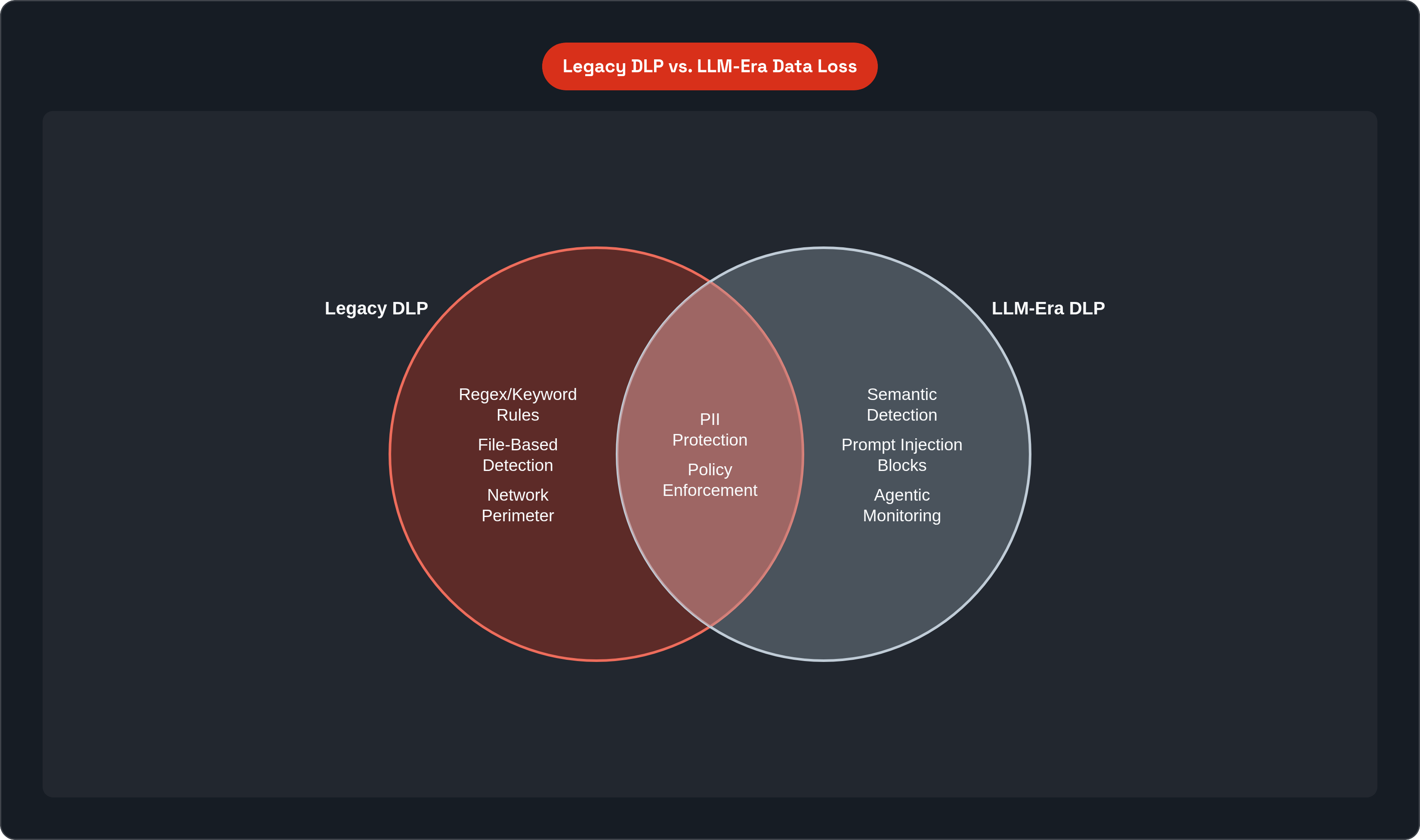
Legacy DLP was built on an assumption: sensitive data lives in known formats, in known places. A credit card number matches a regex, and a file marked "confidential" triggers a rule. That assumption doesn't hold up against a model that can paraphrase, translate, or summarize regulated data into something that sails right past a static inspection point.
The numbers back this up. The SafeGPT paper on arXiv found rule-based DLP systems generating false positive rates above 40% in enterprise LLM workflows. Think about what that means operationally: nearly half the alerts a security team gets are noise, which means real signals get buried, ignored, or actively distrusted.
There's a coverage problem too, one vendors tend not to advertise. Browser-based AI access, the AI features baked directly into Microsoft 365, Google Workspace, Salesforce, and any number of third-party LLM integrations, these all sit outside where traditional endpoint or network DLP was ever pointed. A tool that covers email and endpoints but has nothing to say about browser sessions or SaaS-embedded AI is legacy DLP with a new label stapled on.
And then there's the distinction between alerting and remediation, which matters more than it sounds like it should. Post-event alerting tells you something happened, but it doesn't stop it from happening. If remediation isn't inline, sensitive data has already entered the model's context by the time anyone gets notified, and once it's in there, it can be reproduced, transformed, or exfiltrated through the model's own outputs. There's no recall button. You can't un-ring that bell.
So here's the honest question for any buyer: was this tool good enough for file transfers five years ago? Fine. Is it good enough for what your company is doing with LLMs today? That's a different question, and it deserves a different answer.
Using the OWASP LLM Top 10 as an evaluation baseline
OWASP's LLM Top 10 is useful precisely because it maps threats vendors rarely build their marketing around. The list got a real update in late 2024 for its 2025 edition, reflecting actual incidents and the fast rise of agentic AI. Two entirely new categories got added, and several older ones got substantially reworked.
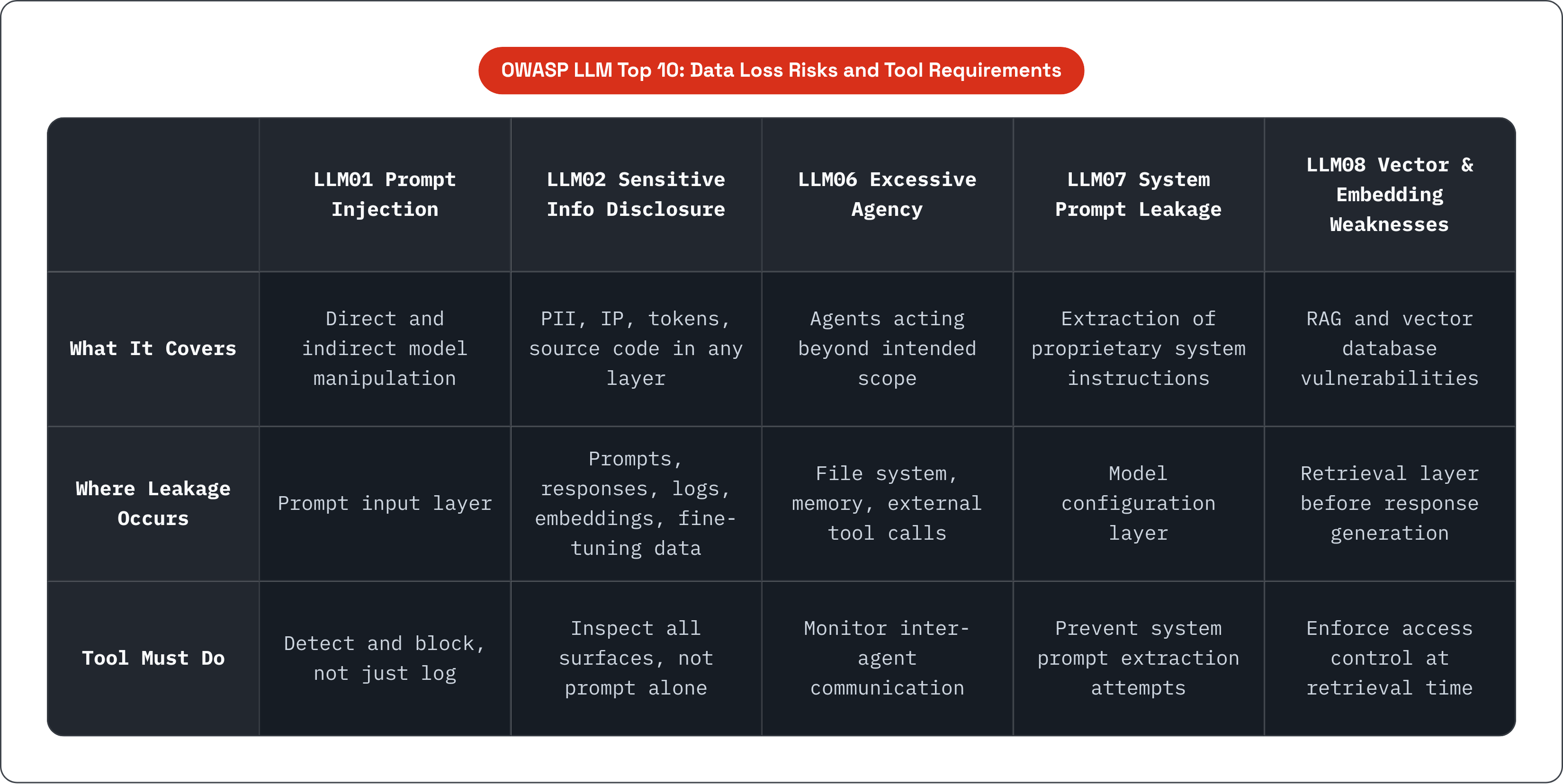
A handful of these map directly onto data loss, and each one implies something specific about what a tool needs to do.
LLM01, Prompt Injection, covers both direct and indirect attacks that manipulate model behavior. A tool needs to detect and block these attempts, not just log them for someone to review after the fact. LLM02, Sensitive Information Disclosure, jumped from sixth place to second in the 2025 edition, which tells you something about how the industry's own experts are ranking urgency. It covers PII, intellectual property, authentication tokens, source code, and financial data showing up anywhere: prompts, responses, logs, fine-tuning datasets, embeddings, cached conversations, external integrations. LLM03, Supply Chain, covers vendor models, plugins, and connectors as attack vectors, a surface that gets overlooked constantly because it doesn't feel like "your" system. LLM06, Excessive Agency, covers agents doing things beyond their intended scope, accessing or transmitting data without authorization. LLM07, System Prompt Leakage, covers extraction of the system-level instructions that expose your proprietary logic. And LLM08, Vector and Embedding Weaknesses, is a brand new 2025 entry addressing vulnerabilities specific to RAG systems and vector databases.
Use this as a checklist in vendor conversations. Ask them to map their controls directly to these specific risks. Any gap in that mapping is a gap in what they're actually protecting you from, whatever the sales deck implies, and honestly, if a vendor can't speak fluently to LLM01 and LLM02 at minimum, they shouldn't be in the conversation at all.
Channel coverage: the first thing to verify before any other evaluation criterion
The question to ask isn't "does it support AI tools." That's too vague to mean anything. The real question is: which specific surfaces does it monitor, by name?
There's a short list worth walking through. Browser-based AI tools, meaning ChatGPT, Claude, or Gemini accessed directly through a browser tab. AI features embedded natively inside sanctioned SaaS platforms, things like Microsoft 365 Copilot, Google Workspace Duet, and Salesforce Einstein. API-based integrations, where an internal application calls out to OpenAI, Anthropic, or a self-hosted model. Shadow AI, the unsanctioned tools employees pick up on their own; Cyberhaven found 71.7% of corporate AI tools carry high or critical security risk. And agentic platforms operating at the OS level, which most legacy tools simply can't see.
Push on this in vendor calls. Ask for a specific list of monitored surfaces, not a category description that sounds comprehensive but says nothing. Ask whether coverage requires an endpoint agent, a browser extension, API proxying, or CASB integration, because each of those has different deployment requirements and, more importantly, different blind spots. And ask specifically whether third-party plugins and connectors inside LLM platforms fall in scope, since that's exactly the supply chain risk OWASP flags under LLM03.
One more thing worth considering: most enterprises aren't running a single LLM. They're running several, plus a handful of copilots, plus agents built on top of all of it, and a tool that only watches one provider or one deployment model is giving you partial coverage while charging for the whole picture.
Detection methodology: semantic understanding versus pattern matching
Why does pattern matching fail so consistently here? Because employees rarely paste raw PII directly into a prompt. They embed it in a question, rephrase it inside a summary request, or fold it into a document they're asking the model to shorten. Regex rules and keyword lists were built to catch a string of digits that looks like a social security number, not a paragraph that discusses one without ever spelling it out.
Summarization, paraphrasing, translation, code generation, all of these transform data in ways that defeat structural matching entirely. And the cost of trying anyway shows up in the false positive numbers. That SafeGPT benchmark on arXiv put rule-based false positive rates above 40%, which creates the kind of alert fatigue that eventually causes teams to stop trusting their own tools. A real incident gets buried in the same pile as forty false alarms.
Semantic, context-aware detection asks a harder question: what does the text mean. That requires sensitivity classification that understands a block of text at the level of meaning, not character matching. It requires intent detection, so the system can tell the difference between a support agent legitimately referencing a customer's name and someone pasting a full customer record into an unauthorized workflow. And it requires output inspection, watching what the model produces and not just what goes in, since outputs can reproduce or infer sensitive content the model was never directly fed in that session.
Prompt injection detection deserves its own mention here, because it's a genuinely distinct problem. These attempts are often written to look completely innocuous to a human reader. Catching them requires a system that understands adversarial prompt structure as its own category, not a content classifier repurposed for a job it wasn't built for.
Latency and false positive rates as practical evaluation metrics
Inline enforcement sits in the path between a user and the model, which means every millisecond of delay is a millisecond the user notices. Add enough friction and people find a workaround, or the organization quietly disables enforcement to keep productivity from tanking. This isn't a minor implementation detail. It's the difference between a control that gets used and one that gets routed around within a month.
The Palit Benchmark Dataset on arXiv gives some real numbers to work with. Lakera Guard scored a false positive rate of 0.057 with a latency of 0.066 seconds per prompt, which is fast enough to sit inline without users noticing much. Azure Prompt Shield and Calypso AI Moderator posted comparable accuracy but latencies of 0.349 and 0.25 seconds respectively. That gap sounds tiny until you multiply it across thousands of prompts a day across an organization; it adds up to a noticeably slower experience, and slow experiences get bypassed.
Accuracy alone doesn't tell the full story either. The same benchmark recorded a baseline model hitting 84.8% accuracy but a false positive rate of 0.438, meaning high accuracy and unusable false positive rates can coexist in the same tool. A false positive in an enterprise workflow is a blocked legitimate business action, and at volume, that becomes pressure to disable the very control you paid for.
So what should you actually ask vendors for? Latency benchmarks specific to their deployment model, since an API proxy, an agent-based install, and a browser extension all behave differently under load. False positive rates measured against something that resembles your actual enterprise content, not a generic public benchmark, because vendor numbers on curated test sets tend to look better than real-world performance. And ask how they handle disputed false positives, since an escalation path that actually works matters more day to day than most people expect going in.
RAG pipelines and agentic workflows as coverage requirements, not edge cases
RAG systems introduce exposure before the model even generates a response. When someone queries an internal knowledge base, the retrieval layer decides which documents get pulled into the model's context. Without filtering right there, at retrieval, a confidential document can enter the model's working context with no prompt-level trigger at all to catch it.
Access control at retrieval time, meaning attribute-based and role-based permissions enforced at that specific layer, is a genuinely separate capability from inspecting prompts and responses. Evaluate it separately, and don't assume a vendor strong on prompt inspection has retrieval-layer controls figured out too, since those muscles get built differently. OWASP's LLM08, Vector and Embedding Weaknesses, targets exactly this surface, so ask directly whether a vendor's controls map to it or whether it's a gap they haven't addressed yet.
Agentic workflows need an entirely different monitoring model. Agents work across multiple steps, calling different tools, carrying context across a chain of actions, and a single inspection point at the prompt level catches none of what happens in the middle of that chain. With close to 23% of organizations already running agent-building platforms per Cyberhaven's numbers, this is already running in production somewhere in most enterprises right now. The relevant OWASP categories here are LLM06, Excessive Agency, and LLM01, Prompt Injection, propagated across multi-step chains rather than contained in a single message.
A few questions worth putting directly to any vendor. Does the tool monitor communication between agents, not just what a human user types in? Does it enforce data access policies at the retrieval layer in RAG setups, or only at the prompt and response boundary? And can it track context accumulating across a multi-turn conversation, rather than evaluating each message in isolation as though it arrived with no history attached?
Third-party vendor AI as a distinct risk surface that most evaluations ignore
Here's a surface that gets skipped constantly in these evaluations: the AI your vendors are running. Your CRM vendor, your HR platform, your customer support tool, plenty of them have quietly built LLM features into their products over the past couple years. Data flows into those models the moment a feature gets turned on, often without anyone on your security team signing off on it.
This connects straight back to OWASP's LLM03, Supply Chain risk. A plugin or connector inside a platform you already trust becomes an attack surface the moment it touches a model you don't control and can't inspect. Most DLP evaluations focus entirely on tools employees choose to use directly. Almost none of them ask what's happening inside the SaaS stack the company already pays for.
Worth asking your vendors directly: which of your product's features route data through a large language model, and where does that data live afterward? It's an uncomfortable question to ask, and an even more uncomfortable one to leave unasked. Given how fast Zscaler clocked enterprise AI traffic growing, at 3,464.6% in a single year, the odds that at least one vendor in your stack has quietly shipped an AI feature you don't know about are higher than most security teams would guess. Worth checking before someone else finds out for you.